
Sometimes the video is not the point. It is the sound. A song you keep hearing, a voiceover you want to save, an original audio clip you plan to use later. Converting a TikTok to MP3 pulls that audio out of the post so you can keep it as a plain music file. This guide explains what “TikTok to MP3” actually means, how to do it in a few seconds with our converter, whether it works for photo-mode posts, what quality to realistically expect, where the file lands on your phone or computer, and the one rule worth remembering before you reuse anyone’s music.
What “TikTok to MP3” really means
Every TikTok already has an audio track riding along with the picture. Converting to MP3 simply lifts that existing track out and saves it on its own, with no video attached. Nothing new is generated and nothing is re-recorded through a microphone. The tool takes the sound that is already in the post and hands it back to you as a music file your phone or computer can play.
That audio can be a few different things depending on the post:
- A song or licensed track the creator added from TikTok’s music library.
- An original sound made by the creator, which other people may have reused across their own videos.
- A voiceover or spoken clip, like a recipe, a story, or a tutorial you want to listen to again.
Whatever the source, the MP3 you get is that same audio, nothing more and nothing less. If the post only has quiet background noise, that is what the file will contain. The converter cannot add music that was never in the post.
How to convert a TikTok to MP3
The whole thing runs in your browser. There is no app to install and no account to make, and it works the same on a phone or a laptop. Start by copying the link to the post you want, then head to our TikTok to MP3 converter.
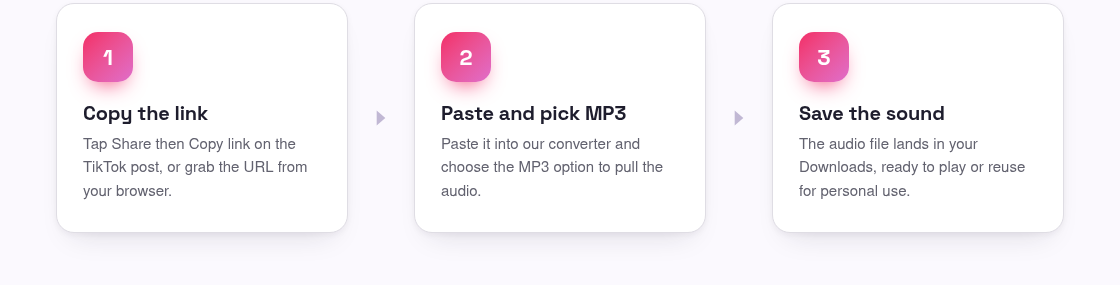
- Open the TikTok post, tap or click Share, and choose Copy link. On a computer you can also copy the URL straight from the address bar.
- Go to the MP3 converter and paste the link into the box.
- Press the button and give it a second or two to fetch the post’s audio.
- Choose the MP3 option, then tap it to save the sound to your device.
The post has to be public. If a profile is private or the video has been deleted, the audio is not served to anyone anymore, so no converter can reach it. If you decide you want the full clip too, the same link works in our main TikTok downloader for a watermark-free MP4.
It works for photo-mode posts too
Photo-mode posts, the slideshow style where still images swipe past, almost always have a song playing underneath. That background music is an audio track just like a video’s, so the converter can pull it out as an MP3 the same way. Paste the photo post’s link, choose MP3, and you get the sound without the pictures.
If it is the images you are after instead, or you want both, our photo downloader saves the stills at full quality. The audio converter and the photo tool cover the two halves of a slideshow post between them.
What quality to realistically expect
Here is the honest part. The MP3 you get is exactly as good as the audio already in the post, and no better. We do not promise a magic bitrate number, because the quality is decided by the source, not by us. A clean studio song added from TikTok’s library will sound crisp. A voiceover recorded on a phone in a noisy room will sound like a voiceover recorded on a phone in a noisy room.
A few things worth knowing so there are no surprises:
- No tool can add detail that was never captured. Converting cannot turn a muffled clip into a hi-fi track.
- If the creator layered a voice over music, or the audio was trimmed inside the app, your MP3 will include those edits, because that is the version the post actually plays.
- Any watermark voice tag some creators add over their sound stays in the audio, since it is part of the original track.
The upside is that you are getting the real, unaltered sound from the post, not a re-recording that loses quality along the way. What was in the post is what lands on your device.
Where the MP3 saves on your phone and computer
Once you tap to save, your device decides where the file lands. It is usually the same place your browser puts everything else it downloads.
- iPhone: the MP3 goes to the Files app, usually under Downloads. Tap the download arrow in Safari’s toolbar to jump to it, then move it wherever you like.
- Android: look in the Downloads folder through your Files or My Files app, or open your browser’s download list to find it right away.
- Windows and Mac: the file drops into your Downloads folder. Press Ctrl + J or Command + J in your browser to open the finished file quickly.
From there you can play it in any music or media app, add it to a playlist for offline listening, or drop it into a video editor. On a phone, saving to Files first and then importing into your editing app is the smoothest route.
A word on music rights and personal use
Saving a sound for your own listening, for reference, or for offline replay is generally the low-risk way to use this. Where it gets complicated is reuse. Most songs on TikTok are owned by artists and labels, and that ownership does not disappear because the track was easy to grab. Reuploading someone’s music, using it in a monetized video, or passing an original sound off as your own can break copyright rules and TikTok’s terms.
The safe habit is simple: keep it personal, credit the creator when you share, and get permission before you build something public around someone else’s audio. Our terms lay this out in plain language, and it is worth a quick read if you plan to do more than listen.
Frequently asked questions
Does converting to MP3 change the video at all?
No. The original post stays exactly as it is on TikTok. The converter just makes a separate audio file from the sound already in the post and saves it to your device. Nothing about the video is edited or removed.
Can I get the music from a photo-mode slideshow?
Yes. The background song on a photo post is an audio track like any other, so pasting the post’s link and choosing MP3 pulls it out. If you want the images as well, use our photo downloader for the stills.
What bitrate or quality will the MP3 be?
The quality matches the audio already in the post. A clean library song sounds crisp, while a phone-recorded voiceover sounds like the original recording. No converter can add detail that was never captured, so we do not promise a fixed bitrate.
Can I convert the audio from a private or deleted video?
No. Private and deleted posts are not served to the public, so their audio cannot be reached by any tool. Only public videos, photo posts, and public stories can be converted.
Is it okay to use the song I saved in my own video?
For personal, offline listening it is generally fine. Reusing someone’s music in a public or monetized video is different, since most tracks are owned by artists and labels. Credit the creator, get permission where you can, and check our terms before you publish.