
That little TikTok logo bouncing around your saved video is the giveaway that you grabbed it with a screen recorder or the in-app Save button. If you want a clean copy, to re-edit a clip, use a sound in your own project, or just keep a video without the username stamped across it, you need to remove the TikTok watermark, not hide it. This guide covers the fast way, the phone way, and the honest limits of every method.
What the TikTok watermark actually is
When you download a video through TikTok’s own Share menu, TikTok burns two things into the file: its logo and the creator’s @username, both drifting around the frame so they can’t be cropped out in one spot. That is deliberate, it is free advertising for the platform. The catch is that the watermark is baked into the pixels, so there is no setting inside TikTok to turn it off.
The only way to get a truly clean file is to fetch the original, un-stamped version that TikTok stores on its servers before the watermark is added. That is exactly what a TikTok video downloader does.
The fastest way to remove it
You do not need an app, an account, or any editing skills. Paste a link and you get the clean MP4 back in a few seconds:
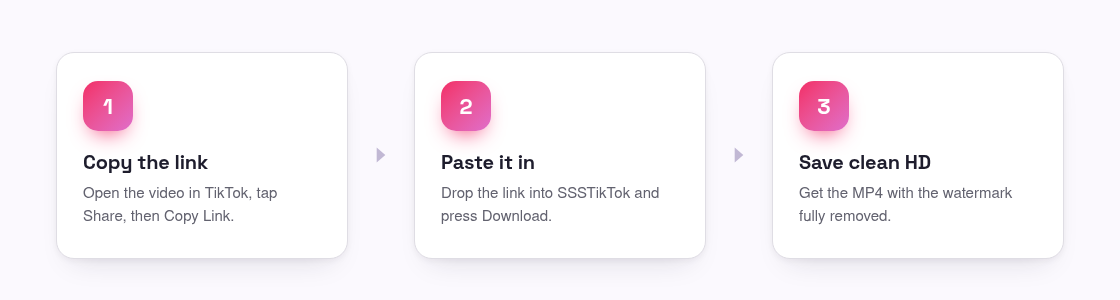
- Copy the video link. In the TikTok app, tap Share, then Copy Link. On tiktok.com, copy the URL from the address bar.
- Paste it into the tool. Open the SSSTikTok downloader, paste the link, and press Download.
- Save the clean version. Choose the HD MP4 without watermark. The file that downloads has no logo and no username on it.
Because it pulls the source file rather than editing your copy, the result keeps the original quality, up to 1080p, with nothing blurred or cropped. If you only want the audio, the TikTok to MP3 converter saves just the sound, and photo-mode posts are handled by the photo downloader.
On your phone: iPhone and Android
The steps are identical on mobile because everything runs in your browser. Copy the link from the TikTok app, switch to Safari or Chrome, open the downloader, and paste. On Android the file lands in your Downloads folder; on iPhone it saves to the Files app, and from there you can move it into Photos. No app install, and nothing to sign up for.
On a computer
On a laptop or desktop the process is even quicker. Open the video on tiktok.com, copy the URL from the address bar, paste it into the downloader in another tab, and the clean MP4 saves straight to your Downloads folder, ready to drop into a video editor.
Why cropping or screen recording does not work
Two shortcuts get suggested a lot, and both fall short:
- Cropping cannot remove a moving watermark, it drifts between corners, so you would have to crop away most of the frame, and you still lose the parts of the video the logo passes over.
- Screen recording captures your screen, not the source, so you get a lower-resolution copy with the watermark still on it, plus any notifications that pop up mid-recording.
Fetching the original file is the only method that gives you full quality with the watermark genuinely gone.
Is it okay to remove the watermark?
Saving a clean copy for personal use, watching offline, keeping a sound you like, or pulling raw material for your own edit, is generally fine. What matters is what you do next. The video still belongs to the person who made it, so re-uploading someone else’s clip as your own, or using it commercially without permission, is not okay and can breach both copyright and TikTok’s terms. Our Terms of Use spell this out: remove the watermark for your own copy, but respect the creator.
Frequently asked questions
Does removing the watermark reduce the video quality?
No. The downloader fetches TikTok’s original file, so the clean version is the same resolution as the source, up to 1080p, not a re-compressed copy.
Is there an app I need to install?
No. It works entirely in your phone or computer browser. Be wary of apps that claim to be required, watermark removal does not need one.
Can I remove the watermark from a private video?
No. Only public videos can be fetched. Private accounts and friends-only posts are not accessible to any downloader, by design.
Does it cost anything?
No. SSSTikTok is free and unlimited, with no account and no watermark on the result.