
Saving a TikTok you love should take seconds, not a tutorial. This is the complete guide to downloading TikTok content the right way: full videos with no watermark, audio pulled out as an MP3, photo-mode slideshows, and public stories. It works on iPhone, Android, and any computer, with no app to install and no login. Below you will find the exact steps for each type of content, what quality to expect, the things that genuinely will not work, and a quick word on keeping it fair.
What you can and cannot download from TikTok
Anything posted to a public TikTok account can be saved. That covers standard videos, the audio track on its own, photo slideshows, and stories that are still live. Our main TikTok downloader pulls the original file straight from TikTok’s servers, so you get the clean, un-watermarked version rather than a screen recording.
What you cannot download is anything the app itself keeps hidden. Private accounts, friends-only posts, and videos the creator has already deleted are not reachable by any tool, because the file is not publicly served in the first place. If a link opens for you only because you are logged in and following that person, it will not open for a downloader. There is no way around that, and any site promising to “recover deleted” or “unlock private” clips is not being honest with you.
How to download a TikTok video without the watermark
This is the most common task, and the process is identical whether you are on a phone or a laptop. The only difference is how you copy the link, which we cover in the device notes below.
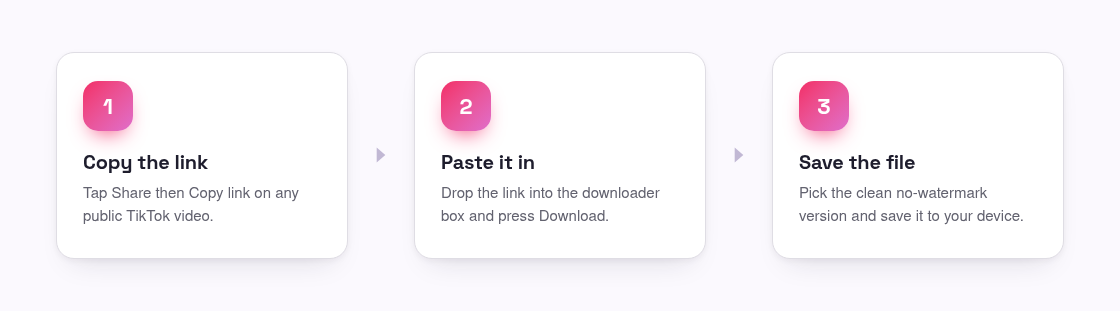
- Open the video in the TikTok app or on tiktok.com.
- Tap Share, then Copy link (in a browser, copy the address bar URL).
- Come back to the downloader and paste the link into the box.
- Press Download and pick the clean, no-watermark file.
- Save it to your camera roll, gallery, or downloads folder.
On iPhone: after pressing Download, the file usually opens in a new tab. Long-press it and choose Save to Photos, or use Safari’s download manager and move it into Photos from Files. iOS sometimes asks permission the first time, so allow downloads when prompted.
On Android: the video saves straight to your Downloads folder in most browsers, and Chrome will show it in the download tray. From there it appears in your Gallery or Files app. Some phones let you save directly to the camera roll.
On a computer: right-click the video and choose Save video as, or click the download button and it lands in your Downloads folder as a standard MP4 you can drop into any editor. If you want more detail on getting a truly clean file, the guide to removing the TikTok watermark walks through it.
Saving TikTok audio as an MP3
Sometimes you want the sound, not the picture: a trending song, a voice-over, or an original audio you plan to reuse. Instead of downloading the video and stripping the audio yourself, paste the same video link into our TikTok to MP3 converter and it hands back the audio as a ready-to-play file.
The steps mirror the video process: copy the video link, paste it, and choose the audio option. This is handy for saving a sound to your phone so you can listen offline, or for grabbing an original audio clip before it disappears. If a track is a licensed commercial song, remember that the rights still belong to the artist, so keep those for personal listening.
Downloading photo slideshows and public stories
Not every post is a video. TikTok’s photo mode turns a set of images into a swipeable slideshow, and a regular video download will not give you the individual pictures. For those, use the TikTok photo downloader, which reads the post and returns each image at full resolution so you can save the ones you want.
Stories work the same way but with a time limit. A TikTok story stays up for 24 hours, so if you want to keep one, save it while it is still live. Paste the story link into the story downloader and it grabs the file before it expires. Once a story has aged out or the account is private, it is gone for good, so timing matters more here than anywhere else.
What quality to expect
The download matches whatever the creator uploaded. Because the file comes from TikTok’s original source rather than a re-recording, the video keeps its native resolution and the audio stays in sync. If the clip was filmed and posted in HD, you get HD back. If it was shot on an older phone or heavily compressed before upload, no tool can add detail that was never there, so expect it to look exactly as it does in the app, just without the spinning username watermark.
Photo slideshows come down at full image resolution, and MP3 audio comes through at the quality embedded in the post. In short, you are getting a faithful copy of the original, not an upgrade and not a downgrade.
Your rights and personal use
Downloading for yourself is normal: saving a recipe to try later, keeping a clip you are in, or building a private reference folder. What you should not do is re-upload someone else’s work as your own or use it commercially without permission. The creator still owns what they made, and licensed music carries its own rights on top of that. A good habit is to credit the original account whenever you share something further, and to check TikTok’s own terms if you plan to use a video for anything public. Our short terms page covers acceptable use in plain language. Treat the tool the way you would treat a screenshot: fine for personal use, not a license to take credit.
Frequently asked questions
Do I need to install an app or create an account?
No. Everything runs in your browser. You paste a link and download the file, with no app, no sign-up, and no login required on any device.
Can I download a private or deleted TikTok?
No. Private, friends-only, and deleted posts are not served publicly, so no tool can reach them. Only content on public accounts that is still live can be saved.
Will the video have a watermark?
No. The downloader fetches TikTok’s original file, so you get a clean copy without the moving username and logo overlay.
How do I get just the sound from a video?
Paste the video link into the MP3 converter and choose the audio option. It returns the sound as an audio file instead of the full video.
Can I save a photo slideshow as separate images?
Yes. Use the photo downloader, which reads a photo-mode post and gives you each image at full resolution to save individually.