

You spent an hour editing a video inside TikTok, saved it as a draft, and now you want that clip sitting in your camera roll so you can back it up, edit it elsewhere, or post it to another app. Here is the honest truth: TikTok has no button that exports a draft straight to your phone. Drafts live only inside the app. But there is a reliable workaround that gets you a clean copy every time, and it takes about a minute. This guide walks through the private-post trick step by step, explains why drafts behave this way, and shows what to do if the video already went public.
Why you can’t export a TikTok draft directly
A draft is not a finished video. When you save one, TikTok stores your raw clips plus a list of instructions: which sound you picked, where the text sits, which filters and effects you added, and how everything is timed. Nothing is stitched into a single playable file yet. That final render only happens when you tap Post. This is also why drafts can vanish if you log out, clear the app’s cache, update the app, or switch phones. They are tied to that one device and that one install.
Because the draft is really a project and not a movie, there is nothing to hand over to your camera roll. To get a saveable video, you have to make TikTok build the final file first. Posting is what triggers that. The good news is you do not have to post it for the world to see.
The private-post trick, step by step
The cleanest way to save a draft is to post it with the audience set to Only me. No one sees it, no notification goes out, and you still get a finished video you can save to your phone. Once it is safely in your camera roll you can delete the post if you want it gone.
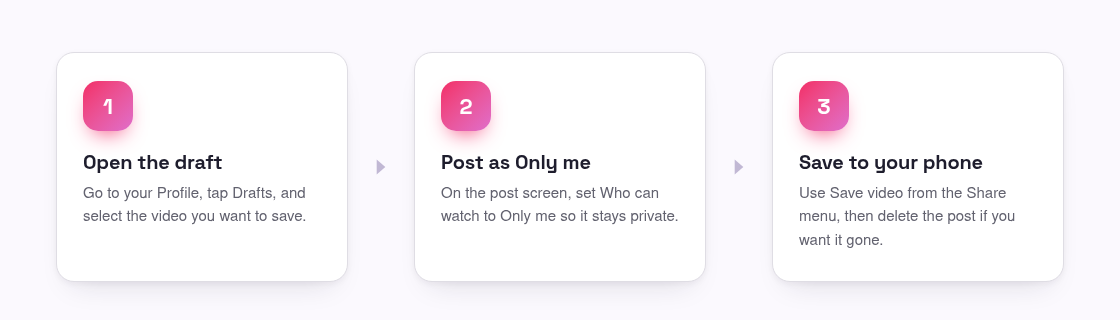
- Open TikTok, tap your Profile, then tap Drafts and select the video you want.
- Tap Next to reach the post screen, then open Who can watch this video and choose Only me. This keeps it private to your account.
- Look for Save to device (sometimes called Save video) on the post screen and turn it on if the option is there. Then tap Post.
- If you did not see that toggle, open the finished private post, tap the Share arrow, and choose Save video. TikTok renders the file and drops it into your camera roll.
- Check your camera roll to confirm the video is there, then delete the post if you no longer want it on your profile.
That is the whole method. The key idea is that posting privately forces TikTok to produce the final video, and once that file exists it is yours to save and reuse.
Once it’s posted, even privately, you own the copy
A common worry is that setting a video to Only me somehow gives it away or makes it public later. It does not. An Only me post is visible to you alone. It will not show up in anyone’s feed, it will not appear on your public profile, and it does not push a notification to your followers. You can leave it private forever or delete it the moment the download finishes. Either way, the video is now a real file on your device.
One thing to know: a video saved this way through TikTok will usually carry the TikTok watermark and your username stamped on it, because TikTok adds that during the render. If a plain, unbranded copy matters to you, keep reading. And remember that saving something you created is fine, while grabbing other people’s clips comes with the usual rules around credit and permission, which you can read about in our terms.
If the draft got posted publicly and you want a clean copy
Sometimes a draft does not stay a draft. Maybe you posted it for real, or you tapped Post before switching the audience. If the video is now public on your profile and you want a tidy copy without the watermark baked in, you do not have to hunt for the original files. You can pull the clean version straight from the public link.
Copy the video’s link from the Share menu, paste it into our free TikTok downloader, and download the un-watermarked HD MP4. It fetches TikTok’s original file rather than screen-recording, so the quality stays sharp and there is no logo across your footage. If you only want the audio from your clip, our TikTok to MP3 tool pulls the sound instead. And if you are curious about how the watermark works and why removing it looks so clean, we break it down in our guide to removing the TikTok watermark.
One honest limit: this only works for videos that are public. If your post is set to Only me or Friends, or if you deleted it, the file is not reachable from a link and no tool can pull it. For private posts, the save-video step inside the app is your route. For public ones, the downloader gives you the cleaner copy.
Tips to avoid losing drafts in the first place
Since drafts are fragile and device-bound, a little habit saves a lot of heartbreak. The safest move is to render and save a copy as soon as you finish editing, rather than leaving important work sitting in Drafts for weeks.
- Do not log out of TikTok while you have drafts you care about, since logging out can wipe them.
- Avoid clearing the app’s cache or reinstalling before you have saved anything important.
- Use the Only me post method to back up finished edits to your camera roll, then keep those files in cloud storage.
- If your draft is a photo slideshow, the same posting trick applies, and you can grab the individual images later from a public post with our TikTok photo downloader.
Treat Drafts as a workspace, not a vault. The moment a video is done, get it out of the app and into your camera roll where it is truly backed up.
Frequently asked questions
Can I save a TikTok draft without posting it at all?
Not really. TikTok has no export button for drafts because a draft is an unrendered project, not a finished video. You need TikTok to build the final file, and posting is what triggers that. Setting the audience to Only me lets you do this without anyone seeing it.
Will an Only me post notify my followers?
No. An Only me post is private to your account. It does not appear in anyone’s feed, it stays off your public profile, and it sends no notification. You can delete it right after the video saves to your phone.
Why does my saved draft have a watermark?
TikTok adds its logo and your username when it renders the final video, so any copy saved through the app carries that stamp. To get a clean version you post the video publicly and download it from the link with our downloader, which fetches the original un-watermarked file.
Can your tool recover a draft I deleted?
No. Deleted drafts and private posts are not reachable from any link, so no downloader can retrieve them. Our tool only works with videos that are currently public on TikTok. That is why saving finished edits early is the safest habit.
My draft disappeared after I updated TikTok. Where did it go?
Drafts are stored locally on your device and tied to your login, so updates, cache clearing, logging out, or switching phones can erase them. There is no cloud backup for drafts, which is why it is worth posting finished ones as Only me and saving them to your camera roll.