

Saving a TikTok on your Android phone is quick, and for a clean copy you do not need to install a single app. The TikTok app has its own Save video button, but it stamps a moving watermark on whatever you keep and it will not let you save some clips at all. The fix is to grab the original file straight from Chrome instead. This guide covers the in-app Save button and where it falls short, how to get a watermark-free copy through our downloader, exactly where the file lands on your phone, and how to pull audio or photo posts the same way. By the end you will have a clean MP4 sitting in your Downloads folder, viewable in Files or your Gallery.
The in-app Save button and why it is limited
TikTok has a built-in way to save videos on your phone. Tap the Share arrow on the right side of any video, then tap Save video, and the clip drops into your Gallery. It works, but it comes with strings attached that catch a lot of people out.
- It adds a watermark. Every video saved this way carries the moving TikTok logo and the creator’s username bouncing around the frame. That is fine for personal viewing but ugly if you want to reuse the clip.
- Some videos cannot be saved at all. Creators can switch off downloads, and when they do the Save video option disappears. TikTok also hides it on certain sounds and Stitches.
- It only saves the video. The in-app button does not give you a plain audio file or the separate images from a photo post.
If a watermarked copy in your Gallery is all you want, the built-in button is the fastest route. If you want a clean file, or the Save option is missing, keep reading.
Copy the video link on your Android phone
The clean route starts with the link. You do not need the address bar or the website for this part, because the TikTok app hands you the link directly. The video only has to be public. If a profile is private or the clip has been deleted, no downloader can reach it, because the file is no longer served to anyone outside that account.
- Open the TikTok app and find the video you want to save.
- Tap the Share arrow on the right side of the screen.
- Tap Copy link in the row of sharing options. The link is now on your clipboard.
That copies an address like https://www.tiktok.com/@username/video/1234567890. If you are watching in your browser instead of the app, tap and hold the address bar and choose Copy to grab the same thing. Either way, that link is all our tool needs.
Paste it into the downloader in Chrome
With the link copied, open Chrome, or Samsung Internet, Firefox, or any browser on your phone, and go to our TikTok downloader. There is no app to install, no login, and nothing to sign up for, which is the whole point of doing this in the browser.
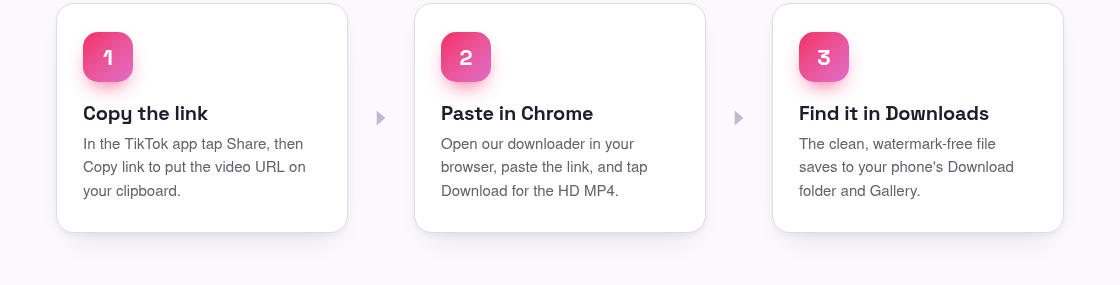
- Tap the input box on the page, then tap and hold and choose Paste to drop the link in.
- Tap the Download button next to the box.
- Wait a second or two while the tool fetches TikTok’s original, un-watermarked file.
- Tap the HD MP4 option to start the save. If Chrome asks whether to allow the download, tap Download to confirm.
This is real extraction, not a screen recording, so the picture stays sharp and there is no logo bouncing across it. If you want the detail on why the app leaves that watermark behind in the first place, our guide to removing the TikTok watermark breaks it down.
Where the file lands on Android
Once the download finishes, your phone tucks the file away in a predictable spot. Chrome shows a small banner at the bottom of the screen when it is done, and tapping that banner opens the file straight away. If you miss it, here is where to look.
- The Downloads folder. Every browser saves to the phone’s Download folder by default. Open the Files app (called My Files on Samsung phones), tap Downloads, and the MP4 is there, newest first.
- Your browser’s download list. In Chrome, tap the three-dot menu and choose Downloads to see everything you have saved and reopen any file with one tap.
- Gallery or Photos. Most phones scan new videos automatically, so the clip usually shows up in your Gallery or Google Photos within a minute. If it does not appear, open it once from the Files app and it will register.
From there you can play it offline, share it to another app, or drop it into a mobile editor like CapCut without a watermark getting in the way.
Save the sound or photo posts too
Not every save is a video. The same copy-and-paste flow handles two other formats on your phone, so you do not have to go looking for a different site.
- Just the sound: paste the link into our TikTok to MP3 tool to pull the audio as a clean MP3. It saves to the same Download folder and plays in any music app. Handy for a song, a voiceover, or a sound you want to reuse.
- Photo posts: for a slideshow-style post, our photo downloader saves the still images at full quality so you can keep each one in your Gallery.
All of it runs in the browser, so the no-app rule holds no matter which format you are after.
No app needed, and a note on credit
The reason to skip the third-party downloader apps on the Play Store is simple: they ask for storage permissions, throw ads at you, and often do the exact same browser trick behind a login. Doing it yourself in Chrome keeps your phone clean and gives you the same watermark-free file in fewer taps.
One reminder before you repost anything: the video still belongs to whoever made it. Saving a clip for offline viewing or personal reference is one thing, but reuploading someone else’s work as your own can break TikTok’s rules and copyright law. The short version is to credit the creator and ask before you share their video widely.
Frequently asked questions
Do I need an app to save TikTok videos on Android?
No. You copy the video link in the TikTok app, then paste it into our tool in Chrome or any browser. The file saves straight to your phone. There is nothing to install and no account to create.
Why does the in-app Save video button add a watermark?
TikTok stamps its logo and the creator’s username onto anything saved through the app’s own Save video button. To get a clean copy, use our downloader instead, which fetches TikTok’s original file without the watermark.
Where does the downloaded video go on my Android phone?
By default it lands in your phone’s Download folder. Open the Files or My Files app, tap Downloads, and it is there. Most phones also add it to your Gallery or Google Photos within a minute.
The Save video option is missing on a TikTok. What now?
Some creators turn off downloads, which removes the in-app Save button. Tap Share then Copy link instead, paste that link into our downloader, and you can still save the video as long as it is public.
Can I save just the sound or a photo post?
Yes. Paste the same link into our TikTok to MP3 tool to pull the audio, or into our photo downloader for a slideshow post. Both save to your Download folder just like a video does.